
Latest find · Latest
X
Polygon: change GTA 6's Movement Speed setting to stop walking slowly by default.
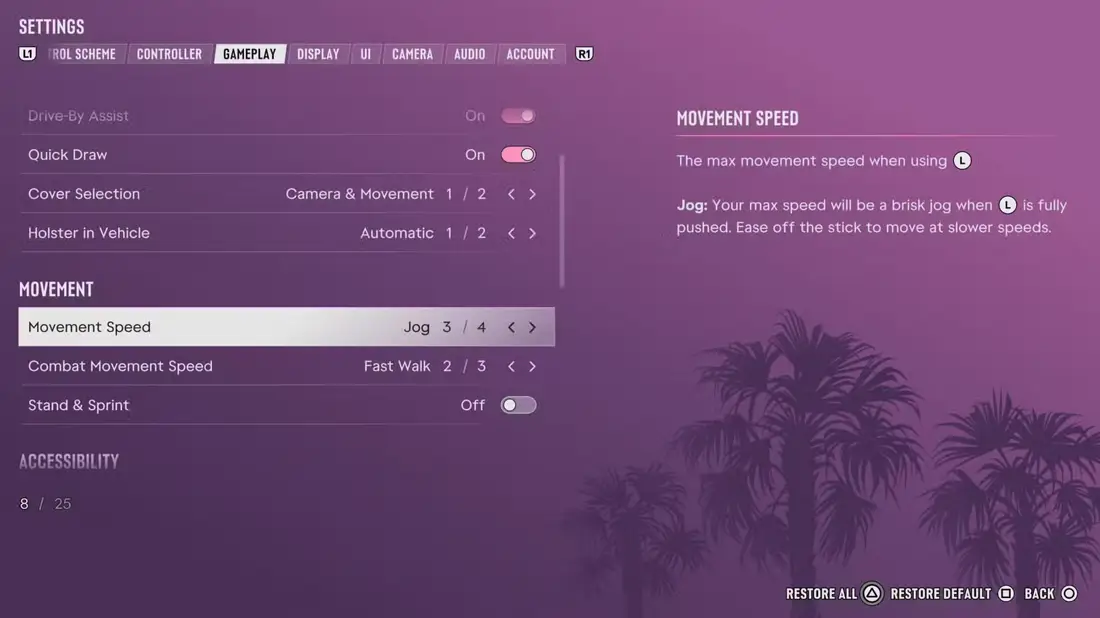
Polygon says GTA 6 players should change the Movement Speed setting first, because by default Jason and Lucia walk slowly when you push the left stick. Per Polygon, you find it in Settings, then Gameplay, then Movement, and you can change the default from Walk to Fast Walk, Jog or Run. Polygon notes that Run sets your top speed before you start to use stamina, not your fastest sprint.
A separate Combat Movement Speed setting, set to Fast Walk by default, controls how you move in a shootout. Polygon also points to a Stand & Sprint option that makes you stand up from a crouch when you run.
Key points
- Settings > Gameplay > Movement > Movement Speed, per Polygon
- Default is Walk, with Fast Walk, Jog and Run options
- Combat Movement Speed is a separate setting
- Stand & Sprint makes you stand up from a crouch when you run


Resources
- Original source @Polygon · GTA 6 Players Should Change This One Setting Before Anything Else
- Linked article Polygon.com: GTA 6 Players Should Change This One Setting Before Anything Else ↗
- On the wiki Latest